
We’re passionate about making OfficeTime easy to use for your team. Our latest version adds several nice improvements.
Use the Check for Updates menu under the Help menu (Windows) or OfficeTime menu (Mac) to update. It doesn’t matter if the whole team is updated however the new features won’t be available to people on older versions.
Per person rates
For years, you controlled rates in OfficeTime through the Category rate.
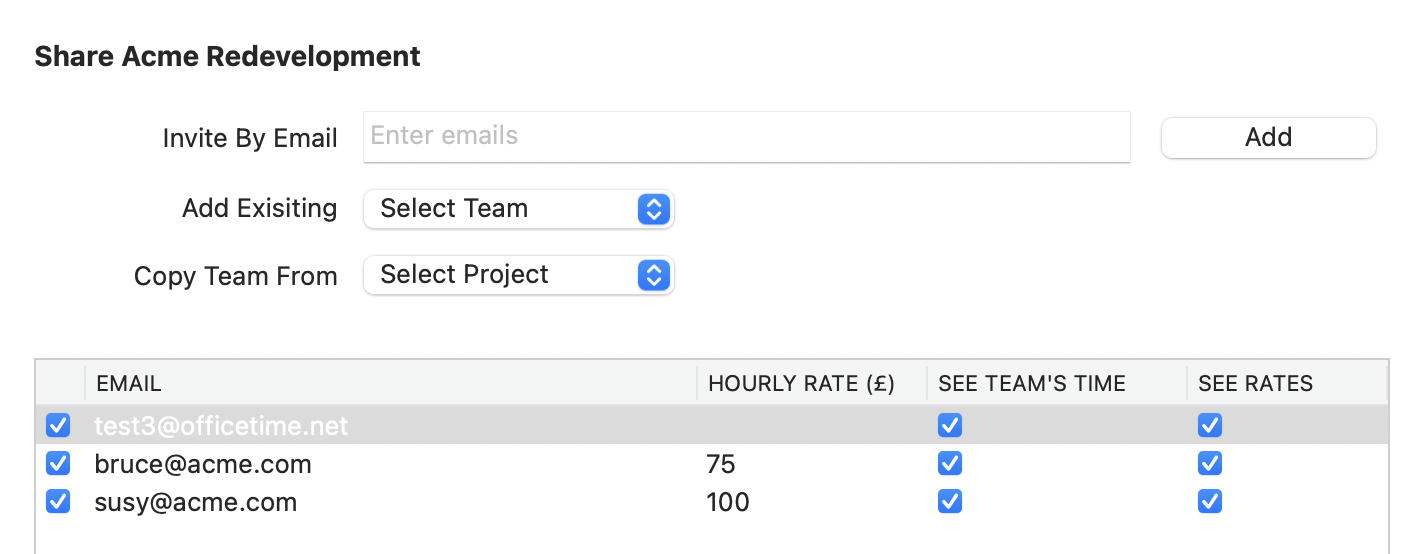
Starting today, you can set per person rates. Simply edit the team on any shared project and set the rates per person. If you don’t set a rate, that person uses category rates like before.
New projects you create will smartly to the rates you’ve set but you can change them anytime. If you assign a Client to a project, another subsequent projects for that client will use those rates.
Easier Sharing
You could always copy a team from another project. But now you can add team members individually from a list without having to type in their emails again.
It’ll even remember their previous rates and permissions.
Category Archiving
Choose Edit->Categories to archive old categories. This keeps all of you existing data but clears your up your category menus. You can still run reports on the old categories.
Archiving a category affects everyone on the team.
More Coming…
We’ve got lots planned for the Business Edition. We’re listening to community feedback and making changes such as allowing project archiving to affect the whole team.
Got suggestions? Email us at support@officetime.net